1. 什么是 ArgoCD
ArgoCD 是 CNCF 毕业级项目,面向 Kubernetes 的声明式 GitOps 持续交付工具。
GitOps 核心思想:Git 仓库作为应用配置的唯一可信源。ArgoCD 持续监听 Git 仓库内定义的应用目标状态,对比集群内资源的实际运行状态,自动完成应用部署、版本更新与故障回滚。
ArgoCD 原生支持多种配置编排方式:Helm Chart、Kustomize、Jsonnet、Ksonnet,以及原生 YAML/JSON Kubernetes 资源清单。
2. 架构原理
ArgoCD 以 Kubernetes 控制器形态运行,持续对应用做状态巡检:
- 拉取 Git 仓库中声明的期望状态(Target State)
- 采集集群内资源实际运行状态(Live State)
- 对比两者差异,不一致时标记为
OutOfSync(不同步) - 可视化展示资源差异,支持手动同步 / 自动同步,将集群状态收敛到 Git 定义的目标状态
Git 仓库中修改清单后,ArgoCD 会感知变更并同步至目标集群,实现“改 Git 即发布”。
具体工作流程参见下面的图片:
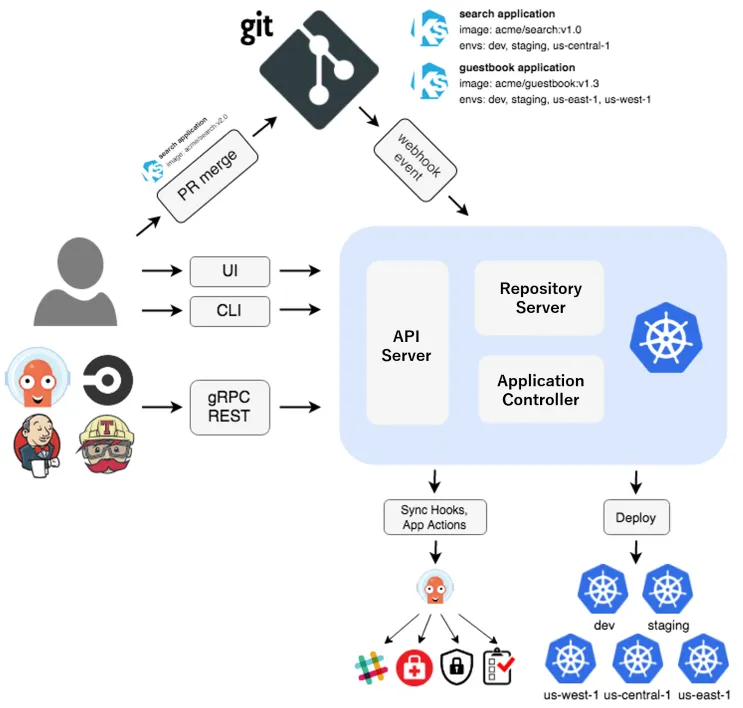
核心组件:
| 组件 | 核心作用 |
|---|---|
argocd-server | ArgoCD API 服务,提供 REST API、Web UI,处理认证鉴权 |
argocd-repo-server | Git 仓库管理服务,缓存仓库代码、渲染 Helm/Kustomize 生成K8s清单 |
argocd-application-controller | 应用控制器,持续做状态比对,执行同步、健康检查 |
argocd-applicationset-controller | ApplicationSet控制器,批量、模板化管理多环境/多集群 Application |
argocd-redis | 缓存组件,存储仓库缓存、应用状态信息 |
argocd-dex-server | 可选,Dex 身份代理,对接OIDC、LDAP等外部身份源 |
argocd-notifications-controller | 可选,通知控制器,同步状态变更推送至邮件、Slack、Webhook等 |
3. 部署
部署前建议查阅官方版本兼容矩阵,选择与K8s集群匹配的ArgoCD版本。
3.1 YAML 清单直接部署
# 下载官方安装清单(示例v2.3.5,按需替换版本)
wget "https://raw.githubusercontent.com/argoproj/argo-cd/v2.3.5/manifests/install.yaml"

# 创建命名空间
kubectl create namespace argocd

# 部署ArgoCD资源
kubectl apply -f install.yaml -n argocd
3.2 Helm Chart 部署(生产推荐)
3.2.1 添加 Helm 仓库
# 添加Argo官方Chart仓库
helm repo add argo "https://argoproj.github.io/argo-helm"

# 更新仓库索引
helm repo update

# 查询所有可用Chart版本
helm search repo argo/argo-cd -l

# 下载Chart包到本地
helm pull argo/argo-cd --untar
3.2.2 自定义 values.yaml
global:
  domain: argocd.wuvikr.top # ArgoCD访问域名
server:
  # 生产环境推荐ClusterIP,通过Ingress对外暴露
  service:
    type: ClusterIP
  ingress:
    enabled: true
    ingressClassName: "nginx"
    hostname: argocd.wuvikr.top
    annotations:
      nginx.ingress.kubernetes.io/force-ssl-redirect: "true"
      nginx.ingress.kubernetes.io/backend-protocol: "HTTPS"
    tls: true
    # 已有证书Secret可启用下面配置
    # extraTls:
    # - hosts:
    #   - argocd.example.com
    #   secretName: argocd-tls
  # Ingress层完成TLS终结时开启
  extraArgs:
    - --insecure

configs:
  secret:
    # 可预先设置admin密码BCrypt哈希,留空自动生成
    # argocdServerAdminPassword: ""
    # argocdServerAdminPasswordMtime: ""
  # 私有Git仓库配置示例
  repositories:
    private-repo:
      url: https://git.example.com/org/repo.git
      passwordSecret:
        name: repo-secret
        key: password
      usernameSecret:
        name: repo-secret
        key: username

# Redis持久化,生产环境必须开启
redis:
  persistence:
    enabled: true
    size: 10Gi
    storageClass: "your-storage-class"

# 开启通知控制器
notifications:
  enabled: true

controller:
  args:
    appResyncPeriod: "180" # 全量状态巡检周期(秒),默认180s
3.2.3 执行安装
helm install argocd argo/argo-cd \
  --namespace argocd \
  --create-namespace \
  --values values.yaml
3.3 获取 Admin 初始密码
默认管理员账号:admin
# 方式1:从Secret解析密码
kubectl -n argocd get secret argocd-initial-admin-secret -o jsonpath="{.data.password}" | base64 -d && echo

# 方式2:argocd CLI获取
argocd admin initial-password -n argocd
3.4 Ingress 配置(Nginx Ingress)
apiVersion: networking.k8s.io/v1
kind: Ingress
metadata:
  name: argocd-server-ingress
  namespace: argocd
  annotations:
    cert-manager.io/cluster-issuer: letsencrypt-prod
    kubernetes.io/tls-acme: "true"
    nginx.ingress.kubernetes.io/ssl-passthrough: "true"
    # 出现307重定向循环时,启用下面注解,Ingress后端使用HTTPS协议访问argocd-server
    nginx.ingress.kubernetes.io/backend-protocol: "HTTPS"
spec:
  ingressClassName: "nginx"
  rules:
    - host: argocd.wuvikr.top
      http:
        paths:
          - path: /
            pathType: Prefix
            backend:
              service:
                name: argocd-server
                port:
                  name: https
  tls:
    - hosts:
        - argocd.wuvikr.top
      secretName: argocd-secret # ArgoCD内置Secret,不要修改名称
提示:
如果 Ingress 注解配置错误,会引发 Dex 跳转异常、307 重定向死循环。
3.4 ArgoCD 客户端 CLI
# github 下载
wget "https://github.com/argoproj/argo-cd/releases/latest/download/argocd-linux-amd64"
# 国内镜像加速
wget "https://gh-proxy.org/https://github.com/argoproj/argo-cd/releases/latest/download/argocd-linux-amd64"

# 赋予执行权限并放入PATH
chmod +x argocd-linux-amd64
mv argocd-linux-amd64 /usr/local/bin/argocd

# 登录ArgoCD服务端
argocd login argocd.wuvikr.top --username admin --password 'YWDGJ0GLYGNfLynq'

# 修改admin密码(生产必做)
argocd account update-password
常用 CLI 命令:
# 查看已接入集群列表
argocd cluster list

# 添加目标集群到ArgoCD管理
argocd cluster add

# 添加SSH协议私有Git仓库
argocd repo add git@gitlab.com:wuvikr-devops/argoapp.git \
  --insecure-ignore-host-key \
  --ssh-private-key-path /root/.ssh/id_rsa
4. GitOps 实战案例:部署Nginx应用
Git 仓库存放 Kustomize 清单,ArgoCD 自动同步到 K8s 集群。
4.1 仓库目录结构(Git仓库)
argo-apps/
└── nginx/
    ├── kustomization.yaml
    ├── deployment.yaml
    └── service.yaml
kustomization.yaml:
apiVersion: kustomize.config.k8s.io/v1beta1
kind: Kustomization
resources:
  - deployment.yaml
  - service.yaml
deployment.yaml:
apiVersion: apps/v1
kind: Deployment
metadata:
  name: nginx-demo
  namespace: demo
spec:
  replicas: 2
  selector:
    matchLabels:
      app: nginx-demo
  template:
    metadata:
      labels:
        app: nginx-demo
    spec:
      containers:
      - name: nginx
        image: harbor.wuvikr.top/k8s/nginx:1.25
        ports:
        - containerPort: 80
service.yaml:
apiVersion: v1
kind: Service
metadata:
  name: nginx-demo
  namespace: demo
spec:
  selector:
    app: nginx-demo
  ports:
  - port: 80
    targetPort: 80
  type: ClusterIP
4.2 创建 ArgoCD Application CR
apiVersion: argoproj.io/v1alpha1
kind: Application
metadata:
  name: nginx-demo
  namespace: argocd
spec:
  # 目标集群与命名空间
  destination:
    server: https://kubernetes.default.svc
    namespace: demo
  # 源:Git仓库地址与路径
  source:
    repoURL: git@gitlab.com:wuvikr-devops/argoapp.git
    targetRevision: main
    path: nginx
  # 同步策略
  syncPolicy:
    automated:
      prune: true # 删除Git中移除的资源
      selfHeal: true # 集群资源被手动篡改,自动修复回Git状态
    syncOptions:
      - CreateNamespace=true # 不存在命名空间则自动创建
应用部署命令:
kubectl apply -f nginx-app.yaml

# 查看应用状态
argocd app get nginx-demo

# 手动触发同步
argocd app sync nginx-demo
测试流程:修改 Git 仓库内 deployment 镜像版本,提交推送 → ArgoCD 检测变更 → 自动滚动更新集群 Nginx。
回滚:Git仓库恢复旧版本清单提交,ArgoCD自动回滚,或者CLI执行 argocd app rollback nginx-demo
5. ArgoCD 完整 GitOps 流水线 CICD 实战
5.1 流水线设计
整体设计分为 CI 和 CD 两个阶段,CI 阶段负责构建、安全扫描、镜像推送;ArgoCD 只负责 K8s 资源的部署与状态收敛。不推荐 ArgoCD 去拉取镜像做构建,职责分离,便于安全管控与排障。
整体架构如下所示:
开发提交代码(Git 业务仓库)
        ↓
【CI阶段】
拉取代码 → 构建镜像 → Trivy 镜像漏洞扫描
        ├─ 漏洞不通过 → 流水线终止、告警
        └─ 扫描通过 → 推送镜像至 Harbor 私有仓库 → CI 自动更新 GitOps 仓库内K8s清单镜像Tag
        ↓
【CD阶段】
ArgoCD 感知 Git变更 → 比对集群状态 → 同步部署到 K8s 集群 → 推送部署结果通知
5.2 流水线关键规则
- 镜像必须推送到私有 Harbor 仓库,禁止直接使用外网公共镜像;
- CI 阶段 Trivy 漏洞扫描作为门禁,扫描出高危漏洞直接阻断流水线,不允许推送到 Harbor;
- 代码和 K8s 清单分别保存在独立 Git 仓库(配置仓库和业务代码仓库分离);
- CI 更新镜像 Tag 后提交 MR,人工评审合并,合并后 ArgoCD 才感知变更。
5.3 GitLab CI 示例(业务代码仓库)
.gitlab-ci.yml:
stages:
  - build
  - scan
  - push
  - update-manifest

variables:
  HARBOR_REGISTRY: harbor.wuvikr.top
  HARBOR_PROJECT: k8s
  IMAGE_NAME: nginx-demo
  IMAGE_TAG: $CI_COMMIT_SHORT_SHA
  FULL_IMAGE: $HARBOR_REGISTRY/$HARBOR_PROJECT/$IMAGE_NAME:$IMAGE_TAG

build:
  stage: build
  image: docker:24
  services:
    - docker:24-dind
  script:
    - docker login $HARBOR_REGISTRY -u $HARBOR_USER -p $HARBOR_PWD
    - docker build -t $FULL_IMAGE .

trivy-scan:
  stage: scan
  image: aquasec/trivy:latest
  script:
    - trivy image --severity HIGH,CRITICAL --exit-code 1 $FULL_IMAGE
  # 存在高危/严重漏洞直接退出,阻断流水线

push-image:
  stage: push
  image: docker:24
  services:
    - docker:24-dind
  script:
    - docker login $HARBOR_REGISTRY -u $HARBOR_USER -p $HARBOR_PWD
    - docker push $FULL_IMAGE

update-git-manifest:
  stage: update-manifest
  image: bitnami/git:latest
  script:
    # 克隆配置仓库
    - git clone git@gitlab.com:wuvikr-devops/argoapp.git
    - cd argoapp/nginx
    # 使用yq修改deployment镜像tag
    - yq eval ".spec.template.spec.containers[0].image = \"$FULL_IMAGE\"" deployment.yaml -i
    - git config user.name "ci-bot"
    - git config user.email "ci@wuvikr.top"
    - git add deployment.yaml
    - git commit -m "CI auto update image tag: $IMAGE_TAG"
    - git push
备注:
- 配置仓库权限,给 CI 机器人账号配置 SSH 密钥,仅允许提交 Tag 变更,不允许删除资源;
- 生产环境建议改成提交MR(Merge Request),人工审核后合并,而不是直接push main 分支。
5.4 流水线验证流程
- 开发提交业务代码,触发 GitLab CI;
- CI 构建镜像,Trivy 扫描,漏洞不达标直接失败告警;
- 扫描通过,镜像推送到 Harbor;
- CI 机器人自动修改 GitOps 配置仓库内的 Deployment 镜像版本并提交;
- ArgoCD 轮询 Git 仓库,检测镜像 tag 变更;
- ArgoCD 同步应用,集群滚动更新 Pod;
- 同步成功/失败,通过 argocd-notifications 推送告警。
6. 生产环境最佳实践
- 权限安全:
- 禁用 admin 账号日常使用,对接 Dex+OIDC/LDAP,基于 RBAC 分配权限;
- ArgoCD ServiceAccount 最小权限原则,不要给 cluster-admin;
- 私有 Git 仓库使用 SSH 密钥或者 Secret 凭证,禁止明文密码写在 yaml。
- 同步策略规范:
- 生产环境不建议直接开启自动同步,可使用手动同步+人工评审;测试环境开启
automated; prune=true谨慎开启,开启后Git删除资源会同步删除集群资源;- 设置合理的
appResyncPeriod,不要过小,避免频繁API请求压集群。
- 生产环境不建议直接开启自动同步,可使用手动同步+人工评审;测试环境开启
- 镜像与仓库:
- 镜像统一推送到私有 Harbor 仓库,清单内全部使用 Harbor 内网地址;
- 遵循 GitOps 最佳实践,将应用源码仓库与 Kubernetes 清单配置仓库分开,互不影响。
- 流水线逻辑:推荐使用 GitOps 分层模型,即 CI负责构建 + 镜像扫描,ArgoCD 负责部署;
- 高可用与存储:
- 生产部署使用 HA 模式,多副本argocd-server、application-controller;
- Redis 必须开启持久化,使用集群可用 StorageClass,防止缓存丢失;
- ArgoCD 数据库定期备份。
- 告警与可观测:
- 开启
argocd-notifications,应用OutOfSync、同步失败推送告警; - 接入Prometheus采集ArgoCD指标,Grafana配置大盘监控同步状态;
- 所有变更保留Git提交记录,审计追溯发布历史。
- 开启
- 多环境管理
- 推荐使用
ApplicationSet做多环境(dev/test/prod)批量管理,避免重复编写大量Application资源; - 环境隔离:不同环境使用独立K8s命名空间或独立集群,Git仓库目录按环境划分。
- 推荐使用
7. 常见坑点
- 私有 Git 仓库拉取失败:检查 repo-server 容器内 SSH 密钥、 known_host 配置;
- 资源被人为修改后不会自动恢复:需要开启
selfHeal: true; - 清单渲染报错:检查 repo-server 权限, Kustomize/Helm 版本兼容性;
参考链接
- ArgoCD 官方文档:https://argo-cd.readthedocs.io/en/stable/
- ArgoCD Helm Chart:https://github.com/argoproj/argo-helm
- GitOps 官方原则:https://opengitops.dev/
- Trivy 官方文档:https://aquasecurity.github.io/trivy/